Introduction
This extension provides seamless integration between PostgreSQL and NATS messaging system, enabling:
- Message publishing to core NATS subjects from SQL
- Subscriptions to NATS subjects that invoke PostgreSQL functions on incoming messages
- JetStream persistent message streams
- Key-Value storage operations from SQL
- Object Store operations (uploading, downloading, deleting files) from SQL
- Works on Postgres Cluster
Initialization
- Install rust >= 1.82.0
- Install prerequisites for pgrx
- Install cargo-pgrx
cargo install cargo-pgrx --git https://github.com/luxms/pgrx --locked
Linux
On most Linux distributions (Debian, Ubuntu, Fedora, etc.), initialize pgrx with:
cargo pgrx init
If you want to specify a custom PostgreSQL version or path to pg_config:
cargo pgrx init -pg<POSTGRES_VERSION> <path to pg_config>
ALT-Linux
On ALT Linux, run:
cargo pgrx init
Or, if you want to specify a custom path and skip version checks:
cargo pgrx init -pg<POSTGRES_VERSION> <path to pg_config> --skip-version-check
Windows
cargo pgrx init
If you want to specify a custom PostgreSQL version or path to pg_config:
cargo pgrx init -pg<POSTGRES_VERSION> <path to pg_config>
MacOS
cargo pgrx init
If you want to specify a custom PostgreSQL version or path to pg_config:
cargo pgrx init -pg<POSTGRES_VERSION> <path to pg_config>
Packaging
cargo pgrx package --pg-config <PATH TO PG_CONFIG> [--out-dir <THE DIRECTORY TO OUTPUT THE PACKAGE>]
Selecting Features
By default, all features (kv, object_store, sub) are enabled.
If you prefer a smaller build or want to customize the functionality, you can selectively enable features like so:
cargo pgrx package --no-default-features --features kv
This will include only the kv feature and exclude object_store and sub.
For example:
--features "kv"– enables only the NATS key-value store.--features "sub"– enables subscriptions and HTTP integration with Patroni.--features "object_store"– enables binary object storage support.
You can combine them as needed:
cargo pgrx package --no-default-features --features kv sub
Vendors
PostgresPro Enterprise Edition
You need to use feature xid8 to build the extension:
cargo pgrx package -pg_config<path to pg_config> --features xid8
Installation
- Copy control file and
*.sqlfiles to the PostgreSQL extension directory. (pg_config --sharedir,$PG_SHAREDIR) - Copy
.so/.dllto the PostgreSQL library directory. (pg_config --libdir,$PG_LIBDIR) - Run
CREATE EXTENSION pgnats;
Warning
To use the
subscribeandunsubscribefunctions, you must add the following topostgresql.conf:shared_preload_libraries = 'pgnats.so'
Configuration
To configure the NATS connection, you need to create a Foreign Server:
CREATE SERVER nats_fdw_server FOREIGN DATA WRAPPER pgnats_fdw OPTIONS (
    --  IP/hostname of the NATS message server (default: 127.0.0.1)
    host 'localhost',

    -- TCP port for NATS connections (default: 4222)
    port '4222',

    -- Internal command buffer size in messages (default: 128)
    capacity '128',

    -- Path to the CA (Certificate Authority) certificate used to verify the NATS server certificate (default: unset, required for TLS)
    tls_ca_path '/path/ca',

    --  Path to the client certificate for mutual TLS authentication (default: unset; optional unless server requires client auth)
    tls_cert_path '/path/cert',

    -- Path to the client private key corresponding to nats.tls.cert (default: unset; required if nats.tls.cert is set)
    tls_key_path '/path/key',

    -- Name of the NATS subject for sending role change notifications (e.g., when the Postgres instance transitions between master and replica)
    notify_subject 'my.subject'

    -- URL of the Patroni REST API used to retrieve the current Postgres instance name.
    -- This is required when sending role change notifications (e.g., when the Postgres instance transitions between master and replica)
    patroni_url 'http://localhost:8008/patroni'
);
Notification payload example
{
  "status": "Master",
  "listen_adresses": ["127.0.0.1", "127.0.0.2"],
  "port": 5432,
  "name": "pg-instance-01"
}
{
  "status": "Replica",
  "listen_adresses": ["127.0.0.1"],
  "port": 5432,
  "name": null
}
Functions
The following functions are available:
Config
-- Reload configuration (checks for changes)
SELECT pgnats_reload_conf();

-- Force reload configuration (no change checks)
SELECT pgnats_reload_conf_force();
Publish
Binary
-- Publish binary data to NATS
SELECT nats_publish_binary('sub.ject', 'binary data'::bytea);

-- Publish binary data with a reply subject
SELECT nats_publish_binary('sub.ject', 'binary data'::bytea, 'reply.subject');

-- Publish binary data with headers
SELECT nats_publish_binary(
  'sub.ject',
  'binary data'::bytea,
  NULL,
  '{}'::json
);

-- Publish binary data with both a reply subject and headers
SELECT nats_publish_binary(
  'sub.ject',
  'binary data'::bytea,
  'reply.subject',
  '{}'::json
);

-- Publish binary data via JetStream (sync)
SELECT nats_publish_binary_stream('sub.ject', 'binary data'::bytea);

-- Publish text via JetStream (sync) with headers
SELECT nats_publish_binary_stream(
  'sub.ject',
  'binary data'::bytea,
  '{}'::json
);
Utf-8 Text
-- Publish text to NATS
SELECT nats_publish_text('sub.ject', 'text data');

-- Publish text data with a reply subject
SELECT nats_publish_text('sub.ject', 'text data', 'reply.subject');

-- Publish text data with headers
SELECT nats_publish_text(
  'sub.ject',
  'text data',
  NULL,
  '{}'::json
);

-- Publish text data with both a reply subject and headers
SELECT nats_publish_text(
  'sub.ject',
  'text data',
  'reply.subject',
  '{}'::json
);

-- Publish text via JetStream (sync)
SELECT nats_publish_text('sub.ject', 'text data');

-- Publish text via JetStream (sync) with headers
SELECT nats_publish_text_stream(
  'sub.ject',
  'text data',
  '{}'::json
);
JSON
-- Publish JSON to NATS
SELECT nats_publish_json('sub.ject', '{}'::json);

-- Publish JSON data with a reply subject
SELECT nats_publish_json('sub.ject', '{"key": "value"}'::json, 'reply.subject');

-- Publish JSON data with headers
SELECT nats_publish_json(
  'sub.ject',
  '{"key": "value"}'::json,
  NULL,
  '{}'::json
);

-- Publish JSON data with both a reply subject and headers
SELECT nats_publish_json_reply(
  'sub.ject',
  '{"key": "value"}'::json,
  'reply.subject',
  '{}'::json
);

-- Publish JSON via JetStream (sync)
SELECT nats_publish_json_stream('sub.ject', '{}'::json);

-- Publish JSON via JetStream (sync) with headers
SELECT nats_publish_json_stream(
  'sub.ject',
  '{}'::json,
  '{}'::json
);
Binary JSON
-- Publish binary JSON (JSONB) to NATS
SELECT nats_publish_jsonb('sub.ject', '{}'::json);

-- Publish JSONB data with a reply subject
SELECT nats_publish_jsonb('sub.ject', '{"key": "value"}'::jsonb, 'reply.subject');

-- Publish JSONB data with headers
SELECT nats_publish_jsonb(
  'sub.ject',
  '{"key": "value"}'::jsonb,
  NULL,
  '{}'::json
);

-- Publish JSONB data with both a reply subject and headers
SELECT nats_publish_jsonb_reply(
  'sub.ject',
  '{"key": "value"}'::jsonb,
  'reply.subject',
  '{}'::json
);

-- Publish binary JSON (JSONB) via JetStream (sync)
SELECT nats_publish_jsonb_stream('sub.ject', '{}'::jsonb);

--  Publish binary JSON (JSONB) via JetStream (sync) with headers
SELECT nats_publish_jsonb_stream(
  'sub.ject',
  '{}'::jsonb,
  '{}'::json
);
Subscribe
Warning
The specified PostgreSQL function must accept a single argument of type
bytea, which contains the message payload from NATS.
-- Subscribe a PostgreSQL function to a NATS subject
SELECT nats_subscribe('events.user.created', 'schema.handle_user_created'::regproc);

-- Multiple functions can be subscribed to the same subject
SELECT nats_subscribe('events.user.created', 'schema.log_user_created'::regproc);

-- Unsubscribe a specific PostgreSQL function from a NATS subject
SELECT nats_unsubscribe('events.user.created', 'schema.handle_user_created'::regproc);
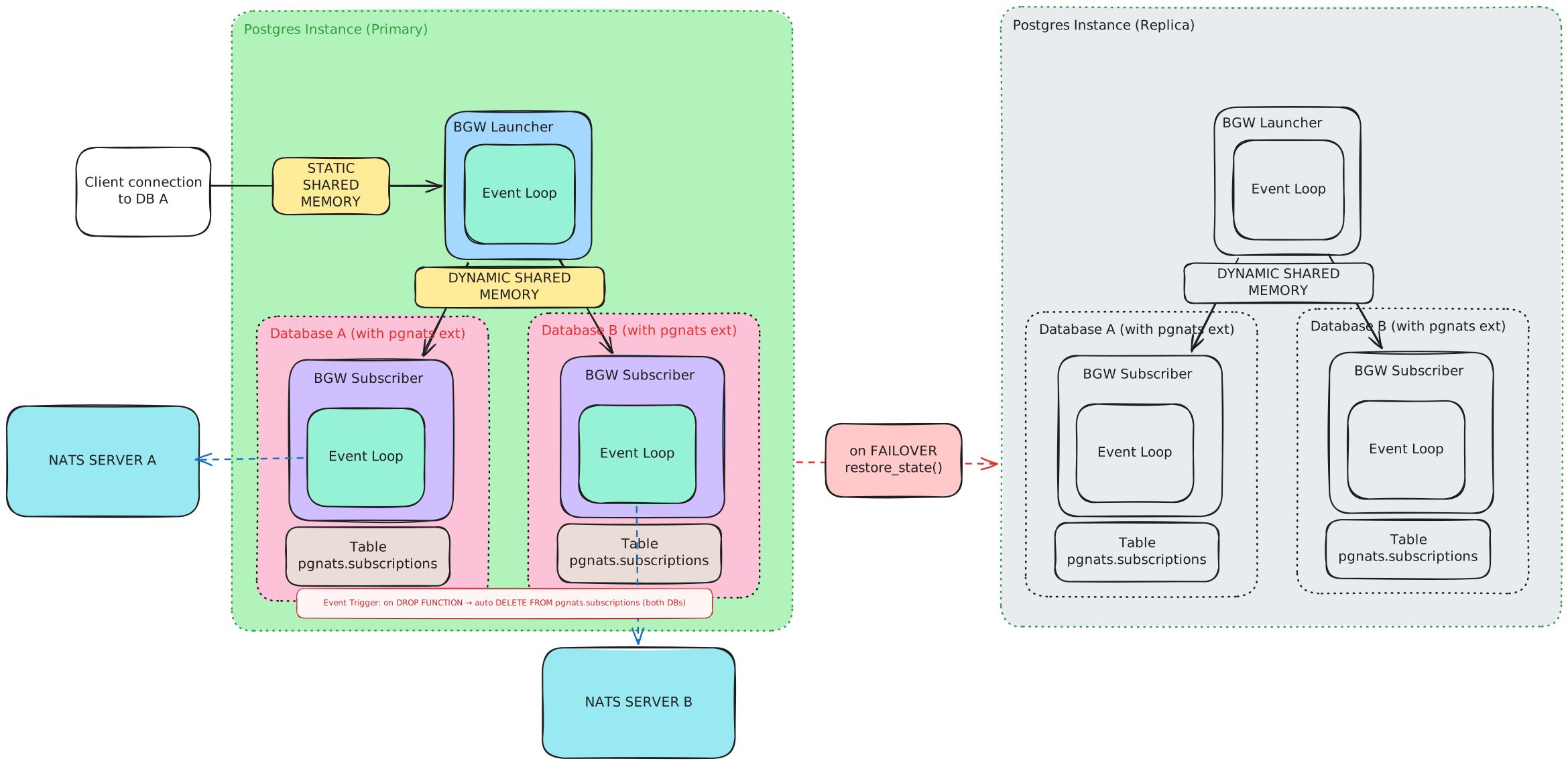
Subscription Architecture
Request
-- Request binary data from NATS (wait for response with timeout in ms)
SELECT nats_request_binary('sub.ject', 'binary request'::bytea, 1000);

-- Request text from NATS (wait for response with timeout in ms)
SELECT nats_request_text('sub.ject', 'text request', 1000);

-- Request JSON from NATS (wait for response with timeout in ms)
SELECT nats_request_json('sub.ject', '{"query": "value"}'::json, 1000);

-- Request binary JSON (JSONB) from NATS (wait for response with timeout in ms)
SELECT nats_request_jsonb('sub.ject', '{"query": "value"}'::jsonb, 1000);
Key-Value
-- Store binary data in NATS JetStream KV storage with specified key
SELECT nats_put_binary('bucket', 'key', 'binary data'::bytea);

-- Store text data in NATS JetStream KV storage with specified key
SELECT nats_put_text('bucket', 'key', 'text data');

-- Store binary JSON (JSONB) data in NATS JetStream KV storage with specified key
SELECT nats_put_jsonb('bucket', 'key', '{}'::jsonb);

-- Store JSON data in NATS JetStream KV storage with specified key
SELECT nats_put_json('bucket', 'key', '{}'::json);

-- Retrieve binary data by key from specified bucket
SELECT nats_get_binary('bucket', 'key');

-- Retrieve text data by key from specified bucket
SELECT nats_get_text('bucket', 'key');

-- Retrieve binary JSON (JSONB) by key from specified bucket
SELECT nats_get_jsonb('bucket', 'key');

-- Retrieve JSON by key from specified bucket
SELECT nats_get_json('bucket', 'key');

-- Delete value associated with specified key from bucket
SELECT nats_delete_value('bucket', 'key');
Object Store
-- Upload file content to NATS Object Store under a given name
SELECT nats_put_file('store', 'file_name.txt', 'file content'::bytea);

-- Download file content from NATS Object Store by name
SELECT nats_get_file('store', 'file_name.txt');

-- Delete a file from the NATS Object Store by name
SELECT nats_delete_file('store', 'file_name.txt');

-- Get metadata for a specific file in the Object Store
SELECT * FROM nats_get_file_info('store', 'file_name.txt');

-- List all files in a given NATS Object Store
SELECT * FROM nats_get_file_list('store');
Meta
-- Get the current extension information about version
SELECT pgnats_version();

-- Retrieves information about the NATS server connection.
SELECT * FROM nats_get_server_info();